AI Assistants for Teams: Use Cases That Save Hours Weekly

AI assistants are no longer “nice to have” tools for individual productivity. When they are designed for teams, connected to shared systems (CRM, ticketing, docs, calendars, data warehouses), and governed with the right permissions, they become a compounding advantage: fewer handoffs, fewer context switches, and faster decisions.
That matters because much of the work inside modern teams is language and process heavy, summarizing, updating systems, drafting responses, routing requests, and extracting data from messy inputs. McKinsey estimates generative AI could automate a meaningful share of time spent on work activities across many roles, particularly tasks involving customer interactions, documentation, and data reporting (McKinsey, 2023). The practical opportunity is not “replace the team”, it is save hours every week by removing repetitive steps.
Below are high-impact, real-world AI assistants for teams use cases (plus guidance on picking the right ones and rolling them out safely).
What “AI assistants for teams” actually means
A team-grade AI assistant is different from a standalone chat tool.
In practice, teams deploy three common patterns:
1) Chat-based copilots (knowledge and drafting)
These assistants live in a web app, Slack/Teams, or your internal portal. They answer questions, draft content, summarize threads, and help people move faster.
2) Workflow assistants (do the work, not just talk about it)
These assistants trigger actions, update records, enrich data, and route tasks across tools. This is where the biggest time savings usually come from because the assistant closes the loop.
3) Voice agents (hands-free, real-time)
Voice agents handle phone calls, field reporting, or on-the-go interactions, then turn speech into structured updates in your systems.
If you want a concrete example of “workflow assistant” and “voice agent” value, see Verge Sphere’s case studies on headless automation and AI voice agents reducing reporting time.
Use cases that reliably save hours weekly (by team)
The best use cases share three traits:
- They happen frequently.
- They require copy/paste between systems.
- They require structured updates (fields, statuses, approvals), not just “a good answer”.
Sales: faster follow-up, cleaner CRM, better pipeline hygiene
Call and meeting follow-ups that update the CRM
An assistant can summarize a call transcript into:
- Deal notes in your CRM
- Next steps and owners
- Follow-up email draft
- Risks and objections captured as structured fields
Why it saves time: reps spend less time on admin and more time selling, and managers stop chasing updates.
Account research and pre-call briefs
Instead of hunting through old emails, tickets, and notes, the assistant generates a one-page brief: latest activity, open issues, renewal date, stakeholders, and past objections. The key is connecting it to your internal sources, not just the public web.
Outbound personalization at scale (with guardrails)
AI can draft highly specific first-touch emails using your ICP rules, approved positioning, and prior deal learnings. The win is speed, but the real win is consistency.
Customer support: faster resolution without sacrificing quality
Ticket summarization and suggested replies grounded in policy
An assistant can summarize long threads and propose a response that cites the relevant policy or knowledge base article (and links it for review). This reduces “time to first meaningful response” and improves handoffs between agents.
Auto-triage and routing
Classify tickets by intent (billing, bug, feature request), urgency, and customer tier, then route to the right queue and pre-fill fields.
Post-resolution updates and knowledge capture
After a fix, the assistant drafts:
- The internal incident note
- A public-facing customer update
- A knowledge base article outline
This is an underused time saver because documentation tends to slip when teams are busy.
Operations: eliminate status chasing and manual reporting
Daily and weekly ops reports compiled automatically
If your ops lead is spending time collecting updates from multiple tools, an assistant can:
- Pull key events from systems (orders, incidents, deliveries, queues)
- Summarize changes vs last period
- Flag anomalies that require a human decision
This can be text-based, or voice-first for field teams.
Incident intake that turns messy input into structured records
Teams often receive incidents via WhatsApp, email, calls, or notes. A workflow assistant can extract entities (who, what, where, when), create a record, notify stakeholders, and request missing info.
(For a voice-first version of this pattern, see the AI voice agent incident reporting case study.)
Finance and procurement: reduce rework and prevent costly errors
Invoice and PO extraction with human-in-the-loop thresholds
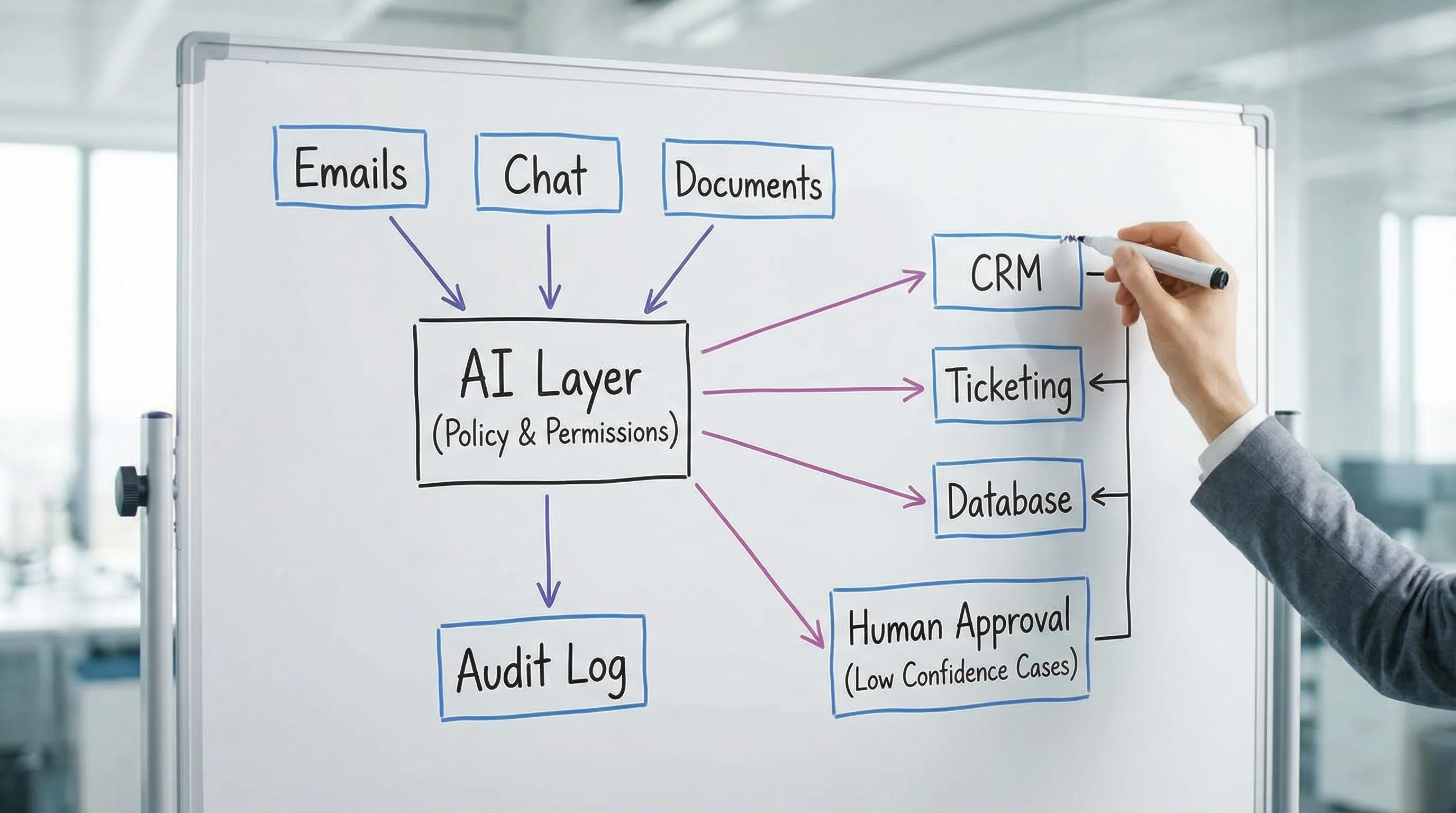
AI can extract fields from PDFs (vendor, totals, line items), then route low-confidence cases for review. This accelerates throughput while preserving controls.
If your bottleneck is scanned or inconsistent documents, this pattern pairs well with enterprise extraction services. Verge Sphere shared an example using Azure AI Document Intelligence for high-volume scanning and structured capture.
Approval workflows that are actually enforced
Instead of chasing approvals in email, an assistant can:
- Validate purchases against policy (limits, vendors, categories)
- Route to approvers in Slack/Teams
- Log the approval outcome back into the source system
HR and people ops: faster onboarding, fewer repetitive questions
Onboarding assistant (policy-grounded)
New hires repeatedly ask the same questions: tools access, benefits, time-off rules, security training. A team assistant can answer using your approved docs and link the source.
Job description and interview kit generation
AI can draft a JD and structured interview questions based on role level and competencies, then a human reviews for accuracy and bias. This saves time, especially for fast-growing teams.
Engineering and product: less time in meetings, more time shipping
Spec-to-task breakdown and backlog grooming
Given a PRD or meeting transcript, an assistant drafts:
- User stories
- Acceptance criteria
- Edge cases
- Test ideas
This is not about replacing product judgment, it is about eliminating blank-page work.
Release notes and stakeholder updates
The assistant summarizes merged pull requests and Jira changes into release notes, internal announcements, and customer-facing summaries.
Production hardening for AI-generated MVPs
If your team used AI to generate an initial codebase, the “hours saved” often disappear later in security fixes and operational cleanup. A production-grade assistant strategy includes code quality, secrets management, and CI/CD rigor. Verge Sphere outlines common pitfalls and a hardening approach in Refining AI-Generated Code.
A simple way to identify the highest-ROI assistant use cases
Before building anything, run a lightweight “workflow audit” with each team lead.
Ask:
- Where do we copy/paste data between tools?
- Which steps require summarizing or translating information?
- Where do approvals stall?
- Which requests are repetitive and high volume?
Then pick use cases that are frequent and measurable.
Here’s a practical prioritization grid you can use internally.
| Use case type | Frequency | Automation difficulty | Best assistant pattern | What to measure |
|---|---|---|---|---|
| Summarize and draft (emails, notes, updates) | High | Low to medium | Chat copilot | Time saved per task, response time |
| Update systems (CRM, tickets, databases) | High | Medium | Workflow assistant | % records updated, cycle time, data completeness |
| Triage and routing | Medium to high | Medium | Workflow assistant | First response time, correct routing rate |
| Document extraction (invoices, PDFs) | Medium | Medium to high | Workflow assistant + OCR/extraction | Review rate, error rate, throughput |
| Voice reporting or call handling | Medium | Medium to high | Voice agent | Handle time, completion rate, escalation rate |
Implementation approach that avoids the usual failures
Most assistant projects fail for predictable reasons: unclear ownership, weak data access controls, or “chat that doesn’t do anything”. A team-grade rollout typically needs four layers.
1) System integrations (where the time savings really comes from)
If the assistant cannot read and write to the systems your team actually uses, it becomes another tab.
Common integrations include:
- CRM (contacts, deals, activities)
- Ticketing/help desk
- Calendar and email
- Knowledge base and internal docs
- Finance and procurement tools
- Data warehouse or reporting layer
2) Knowledge grounding (reduce hallucinations, increase trust)
Team assistants should answer from approved sources. This is often implemented via retrieval workflows (your documents, policies, and structured data), plus citations or links back to the source.
3) Guardrails and governance (permissions, auditability, compliance)
Enterprises should treat assistants like any other system with access to sensitive data.
Key practices:
- Role-based access control, least privilege
- Audit logs for assistant actions (what changed, when, by whom)
- Data minimization (only pass what is needed)
- Clear rules for PII, regulated data, and retention
For a structured risk approach, reference the NIST AI Risk Management Framework, which many organizations use as a baseline for governance.
4) Continuous optimization (the “last mile”)
Assistants improve with real usage data: what people ask, where the assistant fails, where approvals bottleneck. Treat the assistant like a product, not a one-off project.
How to prove “hours saved” (without vague claims)
Executives often ask for ROI, teams want relief, and both are reasonable. The trick is to measure time savings in a way that stands up to scrutiny.
Start with a baseline for 1 to 2 weeks, then compare after rollout.
| Metric | How to baseline | What improvement looks like |
|---|---|---|
| Cycle time | Time from request opened to closed | Faster completion with fewer follow-ups |
| Handling time | Minutes per ticket, report, update | Lower median time, less variance |
| Rework rate | % items returned for missing info | Fewer back-and-forth loops |
| Data completeness | % required fields filled | More complete records automatically |
| Escalation rate | % routed to humans | Lower, but not artificially suppressed |
| Adoption | Active users and tasks executed | Real usage across the team |
A helpful mental model: automate the “boring middle”, keep humans for judgment calls. You do not need 100 percent automation to save meaningful hours.
When you should build a custom team assistant (instead of buying another tool)
Off-the-shelf copilots can work well for general drafting and summarization. Custom becomes valuable when:
- Your workflows span multiple tools and need reliable write-back.
- You need enterprise security, granular permissions, and audit trails.
- You have domain-specific language (industry terms, multilingual input, regional dialects).
- You need real-time voice or event-driven automation.
- You want the assistant to execute a process (not just suggest).
Custom also helps when “AI in the loop” needs to be paired with deterministic rules (policy checks, validations, thresholds) so you get speed and control.
Bringing it all together with Verge Sphere
Verge Sphere builds custom AI assistants for teams that are designed to save time in the systems you already use. That typically includes workflow automation, system integrations, custom AI software, and voice agents where hands-free or real-time interaction matters.
If you want to identify your highest-ROI use cases, map the integrations needed, and sanity-check security and rollout, you can start with a free consultation at Verge Sphere.